
Available in Gold & Enterprise
An effective way to increase visitor engagement with the content of the publication more is to use Product hotspots. Clicking on a Product hotspot triggers an interactive layer to open on top of the publication, providing more product information, like the product title, description, price, and up to six product images. To include the right information in product hotspots, you need to connect the Product feed to your Publication.
Before you start
- You’ll need access to your product catalog data
- Supported formats for automated updates: TSV and XML
- Product ID, Title, Price, URL, Image URL, field availability.
- Optional, but recommended: Brand, Category, GTIN (UPC/EAN).
What is a product feed?
Product feeds are used by product marketing channels like Amazon, Google, and Facebook to take in merchants’ product data for the purpose of displaying product listings. Most e-commerce platforms support at least one product feed format. There are also feed management tools like Lengow and Channable that help you generate feeds in different formats to use on different channels.
How it works?
-
Connect a feed that contains your product catalog.
-
Publitas imports up to 500.000 products from a single feed in the Enterprise plan and up to 100.000 products in the Gold plan.
-
On each refresh, we add new items, update changed fields, and deactivate removed items
-
Ownership: Your team controls feed updates and cadence.
To get a better understanding of how to format your feed for Publitas and what fields Publitas supports, please have a look at this article: Setting up your product feed
Importing your product feed
-
Go to Products > Feeds > Add feed
- Choose Source: URL (recommended) or File upload
- Name your feed and set a refresh schedule (daily/weekly or manual)
- Map your fields to Publitas attributes (Product IDs, Title, Price, URL, Image URL, Availability; optionally Brand, Category, GTINs
-
Run the first import and review item counts in the status page
Tip: Use a stable URL so updates flow automatically into your publications.
Importing a product feed:
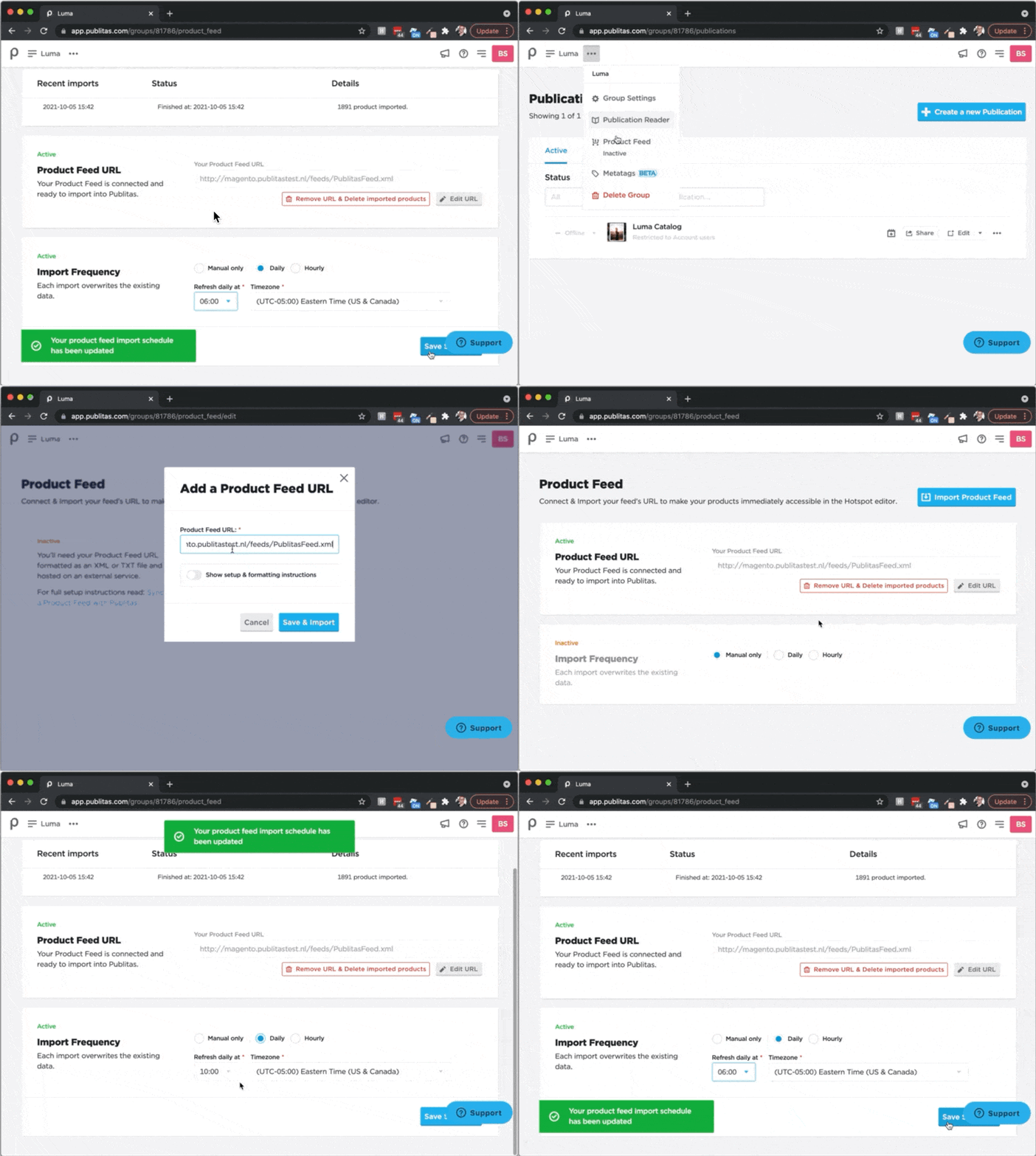
Run import, then validate:
-
Compare source item count vs. imported
-
Spot‑check 5–10 products in publications
-
Resolve errors shown in the feed log (e.g., missing headers, blocked image URLs)
Validation & troubleshooting
-
Common errors: missing required fields, malformed URLs, unsupported currency.
-
Fixes: correct the source file and re-run the import; check that headers match the Supported Feed Attributes.
-
Health checks: confirm item counts after each sync and spot-check a few example products.
Why use GTINs? (optional, but recommended)
A GTIN (Global Trade Item Number, e.g., UPC/EAN) is a standard product code. Sharing GTINs now helps us build future capabilities such as automated enrichment, cross-account benchmarking, and smarter recommendations. We use GTINs to match products and generate aggregated, non-identifiable Insights.
Learn more: GTINs in Publitas
FAQ & next steps
New to feeds? Read Setting Up Your Product Feed.
Which fields do you support? See Supported Feed Attributes.
Need stable updates? See Keeping Products in Sync.