
Available in Gold and Enterprise
Publitas can calculate a price per reference unit from your product feed and show it next to the selling price, so shoppers can compare a 340 g jar against a 500 g jar directly in your publication.
The calculation is based on the two standard Google Merchant unit pricing attributes, so if you already have these in your feed, no feed changes are needed.However, if you still need to add this data to the feed, please follow the instructions below.
Add the unit pricing attributes to your product feed
Include both attributes on every product that needs a base price:
| Attribute | XML | TSV | Description |
|---|---|---|---|
| Unit pricing measure | <g:unit_pricing_measure> |
unit_pricing_measure | The measure of the product as it is sold. Example: 340g |
| Unit pricing base measure | <g:unit_pricing_base_measure> |
unit_pricing_base_measure | The reference measure the price is shown per. Example: 100g |
Both values need a number and a unit, with no space between them. The two attributes must use the same unit: 340g with 100g works, 800g with 1kg does not.
Supported units, matching the Google Merchant specification:
- Weight:
oz,lb,mg,g,kg - Volume:
floz,pt,qt,gal,ml,cl,l,cbm - Length:
in,ft,yd,cm,m - Area:
sqft,sqm - Count:
ct
Unit names are not case sensitive. Any unit outside this list is ignored and no base price is calculated.
How the base price is calculated
Publitas divides the effective selling price by the unit pricing measure and multiplies by the base measure. The effective selling price is the sale price when the product is genuinely marked down, and the regular price otherwise.
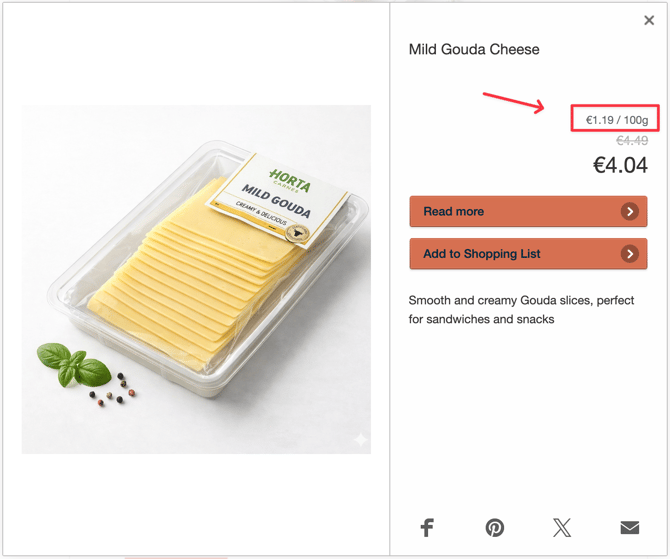
A jar at 4.04 EUR with a measure of 340g and a base measure of 100g gives a base price of 1.19 EUR per 100 g.
You do not need enter or maintain the calculated value anywhere. It is derived on every feed import and used directly in Publitas content.
How to show the base price in product overlays
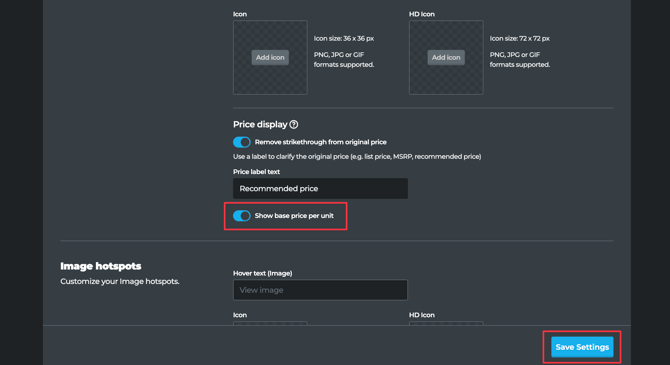
- Open the group options (•••) and go to the Content presentation settings menu.
- Open the Hotspots Settings tab
- In the Product Hotspots section, enable Show base price per unit toggle
- Save the settings
The base price then appears above the regular price in the product overlay. The toggle applies to all publications in that group.
Showing the base price in dynamic and generated products
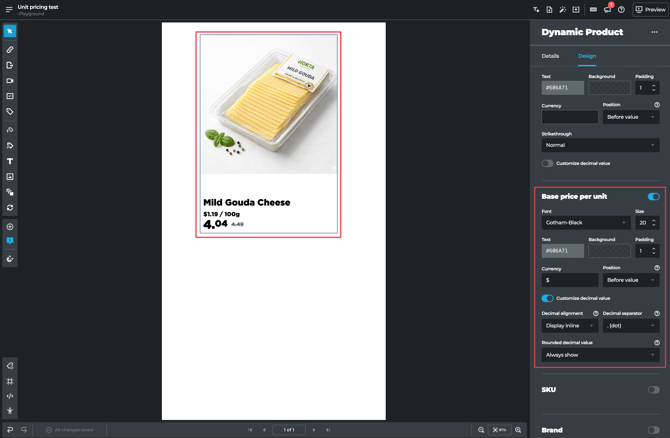
For dynamic and generated products, the base price can also be part of the product theme rather than just the overlay. Two template variables are available: base_price_per_unit for the calculated value and unit_price_measure for the quantity and unit it refers to.
In the theme editor, the base unit price is available as a style field alongside the existing price fields, with the same controls for color, font size, background, spacing, and the decimal panel.
Please note that the template change is not retroactive. Themes created before this release, including legacy themes from before April 2023 and group-level custom HTML themes, show the base unit price field in a disabled state. That is intentional: it signals that the theme template needs a manual update before the base price can be displayed. Newly created themes pick it up automatically.
When no base price appears
In some cases, an empty base price is expected behavior, not an error, and nothing is rendered in its place. The most common causes:
- One or both unit pricing attributes are missing from the product
- The two attributes use different units, for example 800g and 1kg
- The unit is not in the supported list, for example
pcsordozen - The measure is zero, or the product's selling price is zero
- The group toggle is off, or the product theme predates this release
Products that previously packed base price data into custom labels and used a custom implementation keep working as they are. Custom products created directly in the editor are not covered.
Related articles: Supported Feed Attributes, How and when prices are displayed, Setting up your Product Feed, Using the code editor for custom product themes